Room tools
A Tip Menu That Works
A Chaturbate tip menu should make a live room easier to understand. Someone sees an option, understands the token amount and knows what to expect next. The difficult part is usually connecting that simple promise to several moving pieces: the menu in your bio, a chat app, a goal counter and the way you acknowledge requests during a broadcast. This guide walks through a small, maintainable setup, explains the difference between current V2 apps and legacy bots, and gives you a practical troubleshooting sequence. All example activities and token amounts below are editorial examples for learning, not recommended prices, income predictions or promises about what a particular app will do.
Choose the smallest app that solves the job
Write a one-sentence requirement: display six menu items, announce them occasionally and let viewers request the list. Search for that requirement before looking at decorative extras. A large all-in-one bot may be useful later, but its many switches can hide which feature is producing a message or responding to a tip. Read the developer's description, change notes and command list before using it.
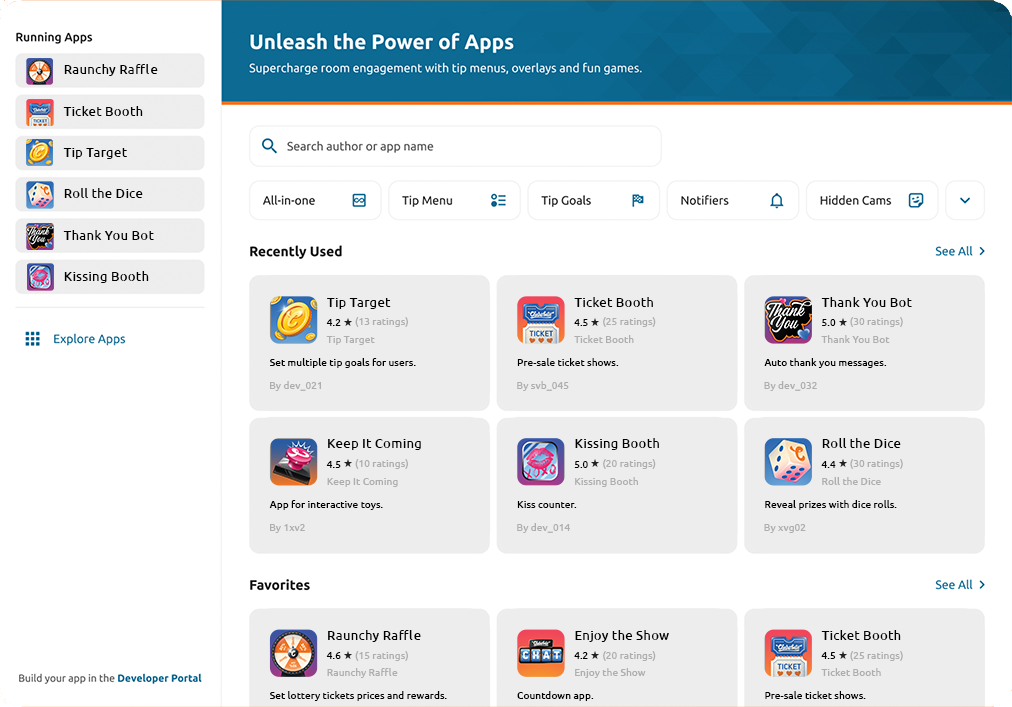
Open Broadcast Yourself → Apps to reach the App Directory. It includes both V2 apps and V1 legacy apps and bots. Search or browse, inspect an app and use its available start and settings controls. Chaturbate identifies legacy entries with a Legacy label; its Apps guide ↗ explains the current directory. Screenshots in older tutorials may show a different arrangement.
Compare candidates with a tiny scorecard: understandable settings, readable output, a usable help page and only the features you need. Do not choose solely because an app has many users or an ambitious name. A good fit is one you can confidently pause, update and troubleshoot during your own show. Save the exact app name and developer so you can find the same project again.
Know what survives between broadcasts
V2 apps continue running between broadcasts and apply settings changes while running. Legacy apps need restarting for each broadcast and for changed settings to take effect. V2 can also retain app data across sessions. These are platform capabilities; what an individual app stores still depends on its implementation. Check its documentation before expecting yesterday's totals to return. Official V2 and legacy comparison ↗.
Separate configuration from session data in your notes. Configuration means your menu names, amounts, colors and notice frequency. Session data means a current goal total, a list of supporters or a progress counter. You might want to keep the former and reset the latter, or preserve a community goal across several evenings. Decide deliberately before pressing a reset control.
Make a restart card with three questions: is the correct app running, does the displayed menu match the master list, and is the counter starting where I intended? That is more reliable than remembering the rules of every app. If you change tools, test with an empty example counter first. Do not migrate a live goal by guessing how a new app interprets previous activity.
Make token amounts unambiguous
Many menu systems identify a request from its token amount. Read your chosen app's matching rules instead of assuming they are universal. If two independent features both listen for the same amount, one tip may produce two responses. Make a small amount map covering the menu, games and any other active integrations before choosing your numbers.
Imagine these fictional amounts: 15 for a lighting choice, 35 for a conversation prompt and 75 for a short celebration. The numbers are only a worked example. If a separate app also uses 35 as its trigger, change one setting or disable the overlapping response. A unique label will not solve a collision when both tools react only to the amount.
Assess the effort behind each option as well as its popularity. A choice that takes ten seconds to acknowledge is different from one that interrupts the room for several minutes. Track how often you can fulfil it without rushing or losing the conversation. Avoid constant discounts during a session: they make your bio stale, create overlapping amounts and make regular visitors uncertain which list is current. Announce any planned change and update every surface together.
Use commands and notices without flooding chat
A command is useful only if it belongs to the app you actually run. There is no safe assumption that /menu, /tipmenu and !menu all work everywhere. For a concrete example, the developer's Tip Menu 4sci documentation ↗ lists /tipmenu and distinguishes the response when a moderator requests it. Treat that as app-specific documentation, not a command guaranteed across Chaturbate.
Choose one discoverable way to ask for the list, then show it in a short notice or your room information. Avoid putting five different commands in every message. A viewer who merely wants to browse should not need to learn your complete control panel. Keep broadcaster-only controls in a private reference sheet rather than advertising them as visitor commands.
For automatic notices, begin with a restrained interval and watch the result in an actual conversation. Our suggested test is one concise reminder every several minutes, adjusted to the room's pace. This is an editorial starting point, not a platform rule. If automated notices dominate the last screen of chat, reduce them. A friendly live acknowledgement is usually more useful than three tools repeating the same thank-you.
Give each feature one owner
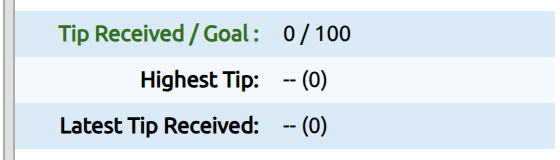
A menu describes individual options; a goal describes collective progress. They can work together, but the setup should explain whether menu tips also contribute to the displayed goal. Read the goal app's counting rules and write down the intended behavior. Do not tell viewers a total represents one thing while the software is counting something else.
Assign one owner to each job: one tool displays the menu, one manages the goal, and one handles recurring rules if you need it. An all-in-one tool can own several jobs, provided the same jobs are disabled elsewhere. This simple ownership map prevents duplicate notices and competing room-topic updates. It also gives you a clear first place to look when something breaks.
Try a fictional 300-token lighting-upgrade goal. Decide whether it lasts for one evening or continues until completed, what happens after the target is reached, and what you will say if the session ends early. The goal should describe a real intention, not imply a purchase or outcome you have not arranged. Leave time to acknowledge completion rather than immediately replacing every achieved target with a larger one.
Test the setup before relying on it
First test what you can without a payment: spelling, menu output, colors, commands and the displayed goal. Use a built-in test or preview function only when the developer documents one. Do not invent a test-tip command or assume a fake chat message reproduces the platform's real tip event. If an app requires a real transaction to verify a behavior, treat that as a separate explicit test with a small budget.
Read the menu on a phone as well as a desktop. Look for dense lines, low contrast and labels that lose their meaning when wrapped. The bio should remain legible without pinching and zooming; chat output should not depend on an elaborate arrangement of spaces. Check any links by opening the actual destination rather than trusting their visible label.
Keep a pass/fail list: correct amounts, correct audience for the notice, one response per trigger, expected goal counting and recoverable settings. Note any uncertainty instead of quietly treating it as a pass. When possible, ask a trusted adult collaborator to report what they see as a normal viewer. They can help validate the experience without receiving your login, stream key or account security codes.
Build a small system you can maintain.
Fix a tip menu that is not showing
Start by identifying what is missing. A menu absent from the bio is a different problem from a chat command that produces no visible result. An OBS preview without a chat notice may be normal because they are separate surfaces. Write the exact symptom before changing settings: where you expected the menu, what you did and what appeared instead.
For chat problems, inspect the app status and its enabled menu setting, then check the documented command and who is allowed to use it. Some responses may be visible only to the requesting person. Next inspect the item format. For example, Flexible Tip Menu ↗ requires its entries to begin with an amount and ignores entries without a leading number. Other apps may use separate fields, so copy the format from their own instructions.
If the settings look right, temporarily stop one overlapping app at a time and retest. Save your configuration first. Record which change restores the output; restarting everything simultaneously can hide the cause. If the problem remains, send the developer the app name, version if shown, an anonymized settings example and the precise failing step. Leave private messages, balances and credentials out of screenshots.
| Symptom | First check | Next action |
|---|---|---|
| No chat output | App running and menu enabled | Use the app's documented command |
| Only one person sees the list | Notice audience | Check public versus requester-only output |
| A menu item disappears | Required item format | Compare with the developer's example |
| Two responses to one tip | Duplicate trigger amounts | Give each feature one owner |
| Old prices in the bio | Separate static copy | Update the master list and every surface |
Plan for a phone-sized room
A menu that looks elegant on your large monitor can become a wall of text on a viewer's phone. Use short labels, generous contrast and ordinary punctuation. Do not rely on very wide banner graphics or many side-by-side prices. Give the bio menu a logical reading order so it still makes sense when the page narrows.
If you broadcast from a phone, prepare the settings on the device where you can comfortably edit them, then verify the resulting room experience on the broadcasting device. Keep your master list accessible offline. Avoid making a complex app migration a few minutes before going live simply because the desktop and mobile controls look different.
Chaturbate currently supports portrait and landscape mobile broadcasting, but its mobile guide ↗ says to stop and restart when changing orientation. Treat orientation as part of your planned layout. A menu graphic positioned for a wide scene may obstruct the important part of a vertical scene. For broader camera and scene preparation, use our OBS setup guide, then return here to verify the chat tools separately.
Review the menu with useful evidence
After several comparable sessions, review which options were chosen, which needed explaining and which interrupted your flow. Keep unusual events separate: a single large supporter can distort an average. Your first useful metric may be fewer confused questions rather than more tokens. A menu is doing its job when people understand their choices and you can deliver them comfortably.
Try changing one weak label before replacing the entire menu. If 'Mood switch' repeatedly needs explanation, test 'Choose blue or pink lighting'. Keep the amount and other conditions stable while you compare. If an option gets attention but is exhausting to fulfil, redesign or remove it. Popularity is not a reason to create a routine you cannot sustain.
Finish your weekly review by synchronizing the master list, app settings and bio, then save a dated copy of the previous version. Keep a short change log with what changed and why. Pair the functional setup with a readable Chaturbate bio design, and keep your account controls covered with our stream privacy guide. The result should feel like one coherent room rather than several tools competing for attention.
LCD · FREQUENT QUESTIONS
FREQUENT QUESTIONS
Do I need a bot for a Chaturbate tip menu?
You can publish a static menu in your bio. Use an app when you want chat announcements or automated responses. Keep the displayed menu and app configuration consistent; they are separate settings.
Why does /tipmenu not work?
The command depends on the app. Check its documentation, running status, menu toggle and response audience. A command copied from another broadcaster's room may belong to a different tool.
Will my apps restart automatically?
Current V2 apps continue running between broadcasts. Legacy apps must be restarted. Check the app type and verify the current menu and counters before each session.
How many tip menu items should I start with?
Our editorial starting point is five or six distinct, comfortable options. That is not a platform limit. Add choices when they serve a clear purpose and remain easy to explain on a phone.
Sources & further reading
- Chaturbate — Apps ↗
- Chaturbate — Tips & Tokens ↗
- Tip Menu 4sci — developer documentation ↗
- Flexible Tip Menu — developer documentation ↗
- Chaturbate — Mobile broadcasting ↗
Platform features can change. Check the current settings in your account.