Privacy & control
Your Room. Your Boundaries.
Chaturbate privacy settings answer several different questions: who can enter your room, who can speak in chat, who can access your account and what personal information appears in your broadcast. No single switch answers all four. This guide builds a practical routine around geo-blocking, account security, moderation and careful publishing, so your choices are deliberate before a stream begins. It also explains the limits of these controls. A public broadcast can be observed or copied, and location filters cannot promise anonymity. The aim is to reduce avoidable exposure and make problems easier to handle while keeping the experience welcoming for the audience you want.
Separate account security from personal privacy
Account security protects access to your login, settings and earnings. Personal privacy concerns the details viewers can connect to your life outside the room. Moderation controls behavior inside the chat. Treat these as three related jobs with different tools. A strong password does not hide a parcel label in the camera background, and a blocked viewer does not repair a compromised email account.
Write two short lists: details you intentionally share, and details that stay private. Your public list might include a stage name, a broad time zone and interests you enjoy discussing. The private list could include your legal name, home address, employer, family accounts and daily travel routes. Use that list when preparing your bio, photos, conversations and external links.
Give yourself a neutral response for questions that cross the line: 'I keep that part of my life private; let's talk about something else.' Practising a simple sentence makes it easier to respond without accidentally explaining more than you intended. You do not need a dramatic confrontation or a detailed excuse. A boundary works best when the wording is clear and you can use it consistently.
| What you want to protect | Useful control | What it cannot promise |
|---|---|---|
| Account access | Unique credentials and 2-Step Verification | That you will never encounter a phishing attempt |
| Regional visibility | Geo-blocking | Complete anonymity or perfect location detection |
| Chat environment | Rules, moderators, silence and bans | That a removed viewer cannot create another account |
| Personal identity | Separate public profiles and a frame audit | That public material can never be connected or copied |
| Published content | Ownership records and reporting tools | Guaranteed prevention or removal of all copies |
Start in the Security Center
Chaturbate's Security Center ↗ reviews email, password and 2-Step Verification. Reach it through Settings & Privacy, the footer link or the official security page. Open it from your own trusted navigation rather than following a stranger's instruction to log in through a special link.
Use a unique password for the broadcasting account and another unique password for the email account that receives its messages. A password manager helps you create and retrieve distinct credentials without turning a stage name, birthday or pet name into a pattern someone can guess. Chaturbate's account protection guidance ↗ recommends unique credentials and warns against entering them on imitation login pages.
Review the email address attached to your account while everything is working. Make sure you can still access it and understand its own recovery process. A polished room is not a substitute for a functioning recovery route. Keep account administration separate from the rush before a broadcast: choose a quiet moment, finish the change and verify that you can sign in normally before moving on to another security setting.
Enable 2-Step Verification and plan recovery
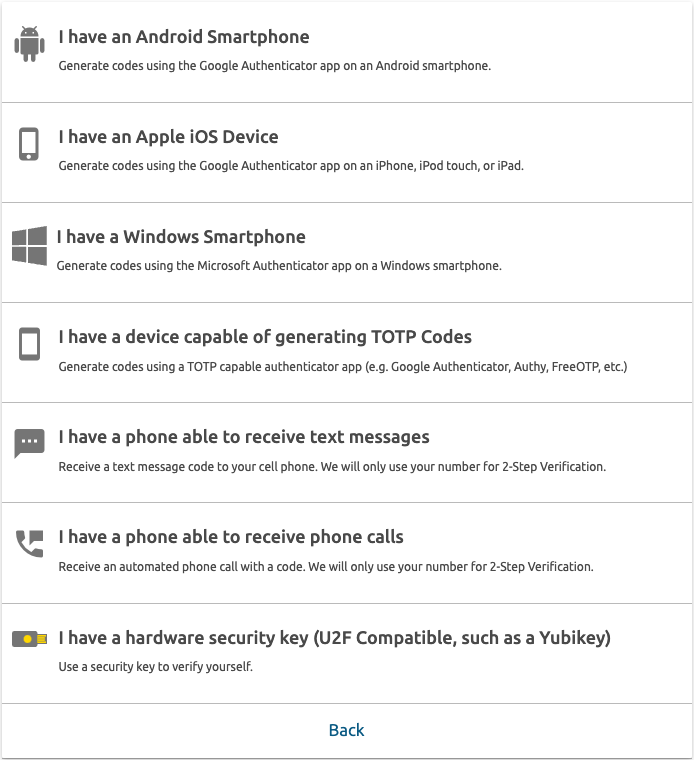
Chaturbate supports a second verification step when signing in, with options described in its 2-Step guide ↗. Set it up through the Security Center and choose a method you can reliably maintain. Follow the actual prompts on your account; do not copy an old tutorial's device names or assume every recovery option looks identical today.
Once configured, confirm a normal login while you still have access to all your devices. Store any recovery material the setup provides securely and separately from a device you could lose. Do not photograph security codes into an automatically shared album or paste them into your stream notes. Think through a simple scenario: if your phone fails tonight, where will you look for the official recovery instructions tomorrow?
Never share a verification code with a moderator, designer, viewer or someone claiming to be support. Someone helping with a bio can deliver HTML and instructions without signing into your account. If an authenticator-generated code is unexpectedly rejected, check the device's date and time before repeatedly changing settings; Chaturbate lists time synchronization in its 2-Step troubleshooting notes ↗. Escalate an unresolved access problem through official support.
Block countries or supported regions deliberately
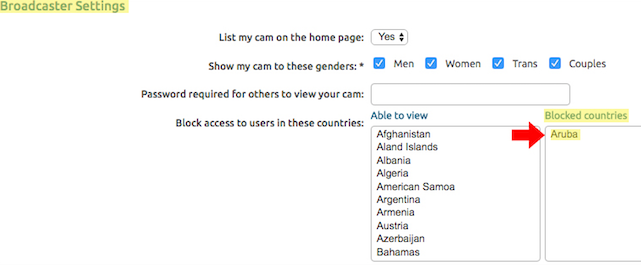
To configure Chaturbate geo-blocking, open My Profile → Settings & Privacy → Broadcaster Settings. Move the relevant countries into the blocked list. The platform also documents state blocking for the United States, province blocking for Canada and region blocking for the United Kingdom. Use the controls available on your account and save the changes. Official country and region blocking instructions ↗.
Make the decision from your own circumstances rather than copying another creator's map. A useful private planning note records which places you selected and why, without publishing that reasoning to viewers. Revisit it when your circumstances change. You should be able to distinguish an intentional restriction from a setting left over from an old experiment.
Location detection depends on IP information and is not fully accurate; methods of bypassing it exist. Chaturbate states this limitation in its Settings & Privacy guide ↗. Therefore, geo-blocking is a reduction in exposure, not proof that nobody from a particular place can see or receive your content. Keep the other privacy steps in place even after the blocked list is saved.
Create a public identity with clear edges
Chaturbate's privacy policy ↗ recommends a distinct username that is not tied to your real name or personal social accounts. Put that idea into practice across the places you intentionally use for your creator identity. Before choosing a new public handle, search it and inspect what already appears. A name you used years ago for a personal hobby may connect more information than you remember.
Review public profiles from a signed-out browser where available. Look at names, profile photos, biographies, tagged content and visible links. Search the exact email address or username you intend to publish. This is a self-audit of your own information, not a reason to collect private information about your viewers. The goal is to understand what a visitor can learn simply by following the links you provide.
Keep a small directory of approved public destinations: your room, creator socials, contact channel and any wishlist you have reviewed. Use those same destinations in your bio and automated notices. A rushed copy-and-paste from the wrong browser profile can publish a personal account by mistake. When someone helps edit the design, give them the approved directory rather than asking them to discover your links for you.
Audit the frame, sound and shared screen
Take a test recording and inspect it at full size before the first live session in a new setup. Look beyond the obvious background: reflective surfaces, documents, shipping labels, calendars, badges and device screens can reveal details. Listen as well as watch. A household notification, a voice assistant or a conversation outside the room can disclose information even when the picture looks tidy.
Move the camera through the positions you actually use during a stream. A safe fixed shot may reveal a window or parcel stack when you stand up, adjust a light or switch cameras. Create a small clean zone around the normal frame instead of relying on one perfect angle. Keep papers and devices with personal information outside that zone.
For any screen-sharing scene, use only the material you intend to show and close personal tabs first. Disable distracting notifications and review source names and browser bookmarks visible in your capture. Test the transition into and out of that scene. A practical backup scene with a neutral graphic lets you pause the visual feed while handling an interruption; practise switching to it before you need it under pressure.
- Read the background as a stranger would.
- Listen for names, alerts and conversations.
- Test camera movement and every shared-screen scene.
- Keep an easy-to-reach neutral scene ready.
Use room controls before a problem grows
Write a short set of room rules that describes behavior, not a long list of personal grievances. Three or four clear principles are easier to follow: respect boundaries, avoid personal-information requests, do not spam, and keep interactions courteous. Place the rules where visitors can find them, then apply them consistently. A beautifully designed bio cannot compensate for rules that change depending on who is asking.
Chaturbate lets you select a username to silence chat for six hours or use Kick/Ban to remove room access. The chat gear menu provides View/Edit Bans and Silences, including permanent-ban management and reversals. Official room control instructions ↗. Check that you selected the correct account before acting, particularly when several usernames look similar.
Decide in advance what gets a reminder and what gets immediate action. An ordinary misunderstanding may deserve a brief explanation; repeated pressure or publication of personal details needs a firmer response. Avoid turning moderation into a public debate that takes over the show. Record serious incidents privately with enough context for support, and let a trusted moderator handle routine repetition when that arrangement works for you.
Give moderators a brief, not your password
A moderator's job is to support the room you want to run. Chaturbate documents that moderators can silence users for six hours and help answer repeated questions, acknowledge support and keep chat orderly. Its moderator guidance ↗ also stresses that the broadcaster remains the focus. App-specific permissions are a separate matter, so review those before enabling moderator commands.
Write a one-page brief: your public rules, topics you keep private, the correct menu link, how to flag a concern and which actions you want discussed first. Include a few example responses so the tone feels like your room. 'The schedule is in the bio' can be friendly; a repeated accusation that viewers failed to read is much less welcoming.
Review the arrangement after a few streams. Is the moderator helpful without dominating the conversation? Are they respecting boundaries even when a regular supporter asks for an exception? Can you reverse a misunderstanding calmly? Keep account credentials and security codes out of the relationship. A moderation role should provide the access needed for moderation, not ownership of your login or control of your personal accounts.
Build a small system you can maintain.
Recognize pressure, fake tips and false authority
Be cautious when a message combines urgency, a reward and a request to move somewhere unfamiliar: 'Do this now, log in here, then receive your payment.' Slow the interaction down. Open the official site yourself, check the actual account information and verify any supposed support request through the normal support channel. A familiar logo or confident tone does not establish who sent the message.
For tips, rely on the platform's actual transaction signals and balance, not an image or a viewer's typed claim. Chaturbate warns about fake tip graphics and people pretending to represent the company in its Tips for Success ↗. Never provide your password or verification code to resolve a claimed tip problem. Do not install unfamiliar remote-access software because a stranger offers to fix your stream.
Prepare two neutral responses: one for verifying a payment and one for declining outside access. For example, 'I'll check the actual tip record first' and 'I handle account changes through official support.' These phrases keep the interaction factual. If the person becomes more aggressive when you ask to verify, stop the exchange and preserve the relevant message rather than trying to win an argument in chat.
Understand network sharing and unwanted copies
Chaturbate distinguishes live affiliate syndication from unauthorized recordings. Its DMCA guide ↗ says affiliate sharing is enabled by default and can be disabled through Settings & Privacy → Appear on network sites → NO. This controls authorized syndication and can affect discovery; it does not erase material that was already copied elsewhere.
If you discover an unwanted copy, collect the exact page and media URLs, the date you found them and a concise description. Chaturbate offers a free notice-assistance process and asks for direct infringing URLs rather than search-results pages. Follow the current form's instructions. Removal is not guaranteed, so keep a simple case log with the submitted URLs and responses instead of assuming one report resolves every copy. Official reporting process ↗.
A visible ownership notice or watermark can communicate your identity and preferences, but it cannot technically prevent recording. Avoid services that promise absolute prevention without explaining their limits. Keep your original media organized so you can identify the content concerned. If a situation involves threats or publication of personal details, treat that as a separate urgent safety issue rather than merely another design or branding problem.
Make privacy a repeatable routine
Before each stream, use a one-minute check: frame clear, notifications quiet, approved links correct, room controls ready and a neutral scene available. After changing location, equipment or public profiles, do a longer review. Small changes create new connections: a different camera angle, a new delivery label or an accidentally reused personal photo can matter more than another decorative privacy badge.
Keep an incident note template outside the public stream: date and time, account involved, what happened, relevant URLs or screenshots, actions taken and support reference. Store only what is necessary to handle the event. Do not publish a viewer's personal information or encourage others to confront them. A precise private record is more useful than an emotional public thread and easier to share with the appropriate support team.
Once a month, review account access, recovery readiness, moderators, geo-block choices and your directory of public links. Remove obsolete links and permissions you no longer need. Pair this routine with a clear bio and room rules and a restrained apps and bots setup. The best system is one you can actually maintain: a few deliberate controls, predictable boundaries and a calm next step when something goes wrong.
LCD · FREQUENT QUESTIONS
FREQUENT QUESTIONS
Can I block my state on Chaturbate?
Chaturbate documents state blocking in the United States, province blocking in Canada and region blocking in the United Kingdom. Check Broadcaster Settings for the options available. IP-based location filtering is not an anonymity guarantee.
Does geo-blocking prevent recordings?
No. It restricts access based on detected location. It cannot stop every observer from copying or sharing content, so keep personal details out of your broadcast and understand the reporting process.
Should my moderator have my password?
No. Use the platform's moderation role and review any app permissions separately. Your login, verification codes and recovery material remain private.
Can a designer update my bio without my login?
Yes. A designer can supply HTML, images, approved links and installation instructions for you to apply. Account credentials are unnecessary for that delivery workflow.
Sources & further reading
- Chaturbate — Security Center ↗
- Chaturbate — Protecting your account ↗
- Chaturbate — 2-Step Verification ↗
- Chaturbate — 2-Step Troubleshooting ↗
- Chaturbate — Blocking countries, regions and states ↗
- Chaturbate — Settings & Privacy ↗
- Chaturbate — Privacy policy ↗
- Chaturbate — Moderator duties ↗
- Chaturbate — Tips for Success ↗
- Chaturbate — DMCA and network sharing ↗
Platform features can change. Check the current settings in your account.